AAVE
 LINK
 LDO
 COMP
 ENS
 YFI
 EIGEN
 ETHFI
 UNI
 PENDLE
 SKY
 LUSD
 GHO
 USDS
 wstETH
 rETH
 tBTC
 ETH
Get started
Get your own
DeFi wallet
Six short steps, from download to your first swap. We show every tap.
Where will your
wallet live?
Your wallet,
your rules
Six steps
to your first DeFi
Download the wallet
- Open the App Store or Google Play.
- Search for Uniswap Wallet and install it.
- Open the app and tap Create a wallet.
Your DeFi wallet is an app. Your money lives in it, and only you can open it.
Save your password
- The app shows 12 words. Together they are the password to your DeFi wallet.
- Write them on paper, in the right order.
- Keep the paper safe at home. Never take a photo of it.
Lose the 12 words and the money is gone. There is no customer service to call, so this paper matters most.
Buy a little ETH
- Tap Buy in your wallet.
- Choose ETH and enter $20.
- Pay with your card, Apple Pay or Google Pay. The ETH lands in a few minutes.
ETH is the currency of DeFi. You pay network fees with it, a few cents each time.
Pick a project
- Start with a name you know, like Bitcoin.
- Tap one below to choose your first.
- You open its page in the last step.
Why tBTC and not BTC? Bitcoin runs on its own network. tBTC is bitcoin on Ethereum, backed 1:1 by real bitcoin, so it works in DeFi.
Start small. Learn with $20 before you move more.
Connect your wallet
- On the project page, tap Connect wallet in the swap box.
- Choose Uniswap Wallet. Your wallet app opens.
- Tap Connect. Your address now shows on the page.
Connecting only shows your address. Nothing moves until you approve a swap.
Swap
- Enter how much ETH to swap, for example $6.
- Tap Swap and approve it in your wallet.
- Open your wallet. Your new token is there.
Keep a little ETH for network fees.
Install the wallet
- Open rabby.io in Chrome or Brave.
- Click Add to Chrome and pin Rabby to the toolbar.
- Open Rabby, click Create new address and pick a lock password.
The lock password only opens Rabby on this computer. The real key comes next.
Save your password
- Rabby shows 12 words. Together they are the password to your DeFi wallet.
- Write them on paper, in the right order.
- Keep the paper safe at home. Never save them on your computer.
Lose the 12 words and the money is gone. There is no customer service to call, so this paper matters most.
Buy a little ETH
- Copy your address in Rabby. It starts with 0x.
- Buy $20 of ETH on Guardarian and paste your address.
- The ETH lands in Rabby in a few minutes.
Already have ETH on an exchange? Send it to your address instead.
Pick a project
- Start with a name you know, like Bitcoin.
- Click one below to choose your first.
- You open its page in the last step.
Why tBTC and not BTC? Bitcoin runs on its own network. tBTC is bitcoin on Ethereum, backed 1:1 by real bitcoin, so it works in DeFi.
Start small. Learn with $20 before you move more.
Connect your wallet
- On the project page, click Connect wallet in the swap box.
- Choose Rabby. A Rabby window opens.
- Click Connect. Your address now shows on the page.
Connecting only shows your address. Nothing moves until you approve a swap.
Swap
- Enter how much ETH to swap, for example $6.
- Click Swap and sign in Rabby.
- Open Rabby. Your new token is there.
Keep a little ETH for network fees.
Done. DeFi is yours now
Your money sits in your wallet, not at a bank or an exchange.
Stuck?
I can't buy ETH in my wallet
Buy ETH on Guardarian and paste your wallet address, or buy it on Coinbase or Binance and send it to your wallet. Do not keep it on the exchange.
I already have crypto on an exchange
Copy your wallet address, paste it in the withdraw form on the exchange and send a small test amount first. When it arrives, send the rest.
How much do I need to start?
About $20 is enough to learn. Every payment costs a small network fee, like a stamp on a letter. On the network our guide uses, that fee is a few cents.
Where do I find my wallet address?
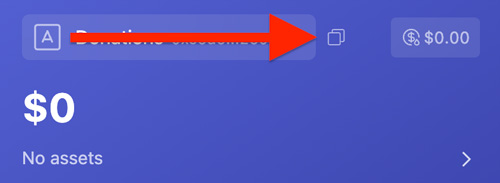
Tap the copy icon at the top of Uniswap Wallet. The address starts with 0x and is safe to share.
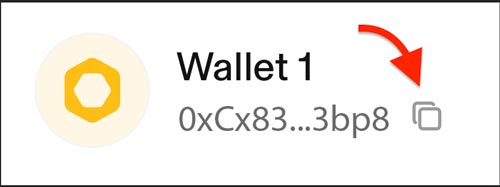
Where do I find my wallet address?
Tap the copy icon at the top of Rabby Wallet. The address starts with 0x and is safe to share.